


Natural Grocers
3.5187.00 Reviews
App Specs
- Version
- 3.5.3
- Updated On
- License
- Free
- Downloads
- 100,000+
- Developer
- Vitamin Cottage Natural Food Markets, Inc.
- Categories
- Shopping
- Platform
- Android
Screenshots
 Analysis by AppCompare
I approached Natural Grocers as a practical shopping companion rather than a general food-discovery app. It comes from Vitamin Cottage Natural Food Markets, Inc., the developer behind the Natural Grocers retail brand, and its focus is straightforward: helping people interact with that store from a phone. The app is free, rated for Everyone, and sits in the shopping category, so it is aimed at ordinary grocery trips rather than specialist nutrition software.
That narrow purpose is important when deciding whether it deserves space on your device. I would not install it expecting a complete meal planner, a broad marketplace, or a replacement for every grocery tool. I see more value in treating it as a store-specific utility: useful when Natural Grocers is already part of your routine, less compelling when you mainly compare several retailers or prefer to shop without creating another digital connection.
What the app feels like in a real shopping routine
My first test for a retail app is whether it reduces friction before and during a trip. Natural Grocers makes the most sense when I already know I want to shop at this particular retailer and want a phone-based way to stay connected to that experience. That could mean checking the app before leaving home, keeping it available while moving through the aisles, or using it as a reference point when I am deciding whether a store-focused tool is worth maintaining.
A realistic example is a weekday evening when I am planning a small restock rather than a full weekly shop. I might open the app before leaving, decide whether it adds enough convenience for that visit, and keep my phone available for any store-related task the app supports. The benefit is not dramatic automation; it is having one retailer’s mobile presence in one place instead of relying entirely on a browser search or a paper note.
That distinction also keeps expectations sensible. A store app can be convenient without being a complete shopping system. If my main goal is to compare prices across supermarkets, build a detailed pantry inventory, or coordinate a household list with several people, I would normally choose a dedicated shopping-list app or a broader retailer platform. Natural Grocers is more relevant when the store itself is the center of the task.
The current release is version 3.5.3, and the app supports Android 8.0 and later. In practical terms, that gives it a reasonably broad reach among people using older Android phones, while still making the operating-system requirement worth checking before installation. The app has passed the threshold of over one hundred thousand installs, with an average rating of 3.5 from roughly three hundred ratings and nearly two hundred written reviews. I read that rating as a mixed signal: enough adoption to show real interest, but not a reason to assume every shopper will find the experience equally smooth.
Trust starts with the narrow purpose
For me, trust in a shopping app begins with understanding why it exists. Natural Grocers has a clear connection to a named retailer and a named developer, rather than presenting itself as an anonymous bargain tool. That does not automatically make every interaction ideal, but it gives the app a recognizable context: I can decide whether I want a direct digital relationship with this store instead of wondering who is behind an unrelated shopping utility.
Worth Reading Before You Choose

EA SPORTS FC Mobile 26 Is a Bigger Football Game, but It Takes Time

Flipboard Shows What News Apps Must Do Beyond the Feed

Switching to Android Auto Means Rethinking Your Driving Routine

Google Calendar Makes a Crowded Week Easier to Manage

Ludo King Makes the Most of the Minutes Between Plans

Baby Panda World Brings Quick Play to Modern Phones, but Its Game Library Feels Busy
The app’s store summary describes it as a natural food market tool, while its short description identifies it with Natural Grocers. Those phrases are brief, but they point to a focused identity rather than a generic coupon or product-scanning app. I find that useful because it limits the assumptions I bring to the installation. I would judge it on how well it supports Natural Grocers shopping, not on whether it competes with every grocery service available on Android.
The age classification is Everyone, which makes the app broadly approachable for households that share shopping responsibilities. That label is not a guarantee of a perfect experience for every person, but it does fit the ordinary retail purpose. I would still make my own decision about account access and phone permissions, especially if a family member is using the device or if the phone contains sensitive information.
Permissions, data choices, and what I check first
When I install any retailer app, I pause before accepting requests automatically. I look at the permissions Android presents, consider whether each one matches the task I expect to perform, and deny anything that seems unrelated. I apply the same rule here. A shopping app should earn access through a clear reason that I understand at the moment it asks, not through habit or pressure.
This is also why I avoid treating a free download as cost-free in every sense. There is no purchase price for the app, but a user may still be deciding whether to create an account, share contact details, allow notifications, or remain signed in. Those are separate choices. I prefer to make them one at a time, because a convenient login can become unnecessary exposure if I only need occasional store information.
One of the most useful habits is to install the app without rushing through the first screens. I read the wording around sign-in, notice whether skipping is offered, and check Android’s permission manager afterward. If I later stop using the app, I review its permissions again and remove access that no longer serves a purpose. This is not specific to one retailer, but it matters particularly for shopping apps because they can sit on a phone for months after a single purchase.
I also keep notifications under review. Alerts can be useful when I actively want store reminders, but they can become noise when I am not shopping. Turning off nonessential notifications does not mean abandoning the app; it simply restores control over when the retailer enters my day. I would rather open the app intentionally than let every installed shopping service compete for attention.
Account control matters more than a quick setup
If the app invites me to sign in, I consider how often I will use it before handing over more information. A regular Natural Grocers shopper may find an account worthwhile if it makes repeated visits easier. Someone who visits occasionally may prefer to keep the relationship lighter and use only the portions of the app that work without ongoing personalisation, if those options are available on their device.
I never reuse a password from email, banking, or another important service for a grocery account. A unique password and a password manager make the decision easier because I do not have to trade security for convenience. I also check whether the app keeps me signed in and whether Android offers a simple way to clear its stored data when I want to start fresh.
For shared phones, I would be more cautious. A logged-in retail app can expose shopping-related information to anyone who can unlock the device, depending on what the app displays. I would use the phone’s screen lock, avoid leaving the app open in public, and sign out if another person regularly uses the same handset. These small choices give me more agency than assuming the default setup is automatically right for my household.
The same thinking applies to uninstalling. Removing an app from the phone is not something I treat as a complete privacy routine by itself. Before deleting it, I check for any account settings I want to change and remove saved access where appropriate. I do not assume that a dormant account is the same as a closed account, and I prefer to make that distinction deliberately.
Data-sensitive moments during an ordinary trip
The most sensitive moments are usually not the dramatic ones. They are the quiet prompts that appear while I am trying to shop: a request to enable a feature, a reminder to sign in, a location-related question, or a notification preference presented as part of setup. I slow down at those points and ask whether the benefit is immediate and clear.
Location is a good example. If a store app asks for location access, I want to know why I need it at that moment. If I am not using a location-dependent function, I would rather keep access off or limited through Android’s controls. The same approach applies to contacts, photos, camera, and other sensitive areas: I grant access only when the task plainly requires it, and I revisit the decision later instead of treating it as permanent.
I am also careful when using the app on public Wi-Fi. Grocery shopping is not usually a high-risk activity, but I still avoid entering sensitive credentials while connected to an unfamiliar network. At home, I check that the app is updated through the official app store and that my phone itself receives security updates. The current release being 3.5.3 tells me which version I am evaluating, but it does not replace my responsibility to keep the installation current.
Another overlooked issue is the phone screen itself. A notification preview can reveal more than I want displayed on a lock screen, particularly on a shared device. I adjust previews at the system level and disable alerts I do not need. This is a practical way to protect personal choices without abandoning the convenience of a retailer’s mobile app.
Where it fits beside familiar alternatives
Compared with a paper list, Natural Grocers offers a more direct digital connection to one retailer, but paper remains better for speed, privacy, and zero setup. I can write a few items without signing in, charging my phone, or thinking about permissions. For a short, predictable trip, that simplicity may win.
Compared with a general shopping-list app, the retailer app has the advantage of being tied to Natural Grocers rather than asking me to recreate the store context manually. A dedicated list tool usually wins when I shop at several stores, share lists with family, or need recurring household workflows. I would choose the dedicated tool for coordination and use the Natural Grocers app only when its store-specific role adds something meaningful.
Compared with a supermarket’s full online-ordering platform, this app should be judged by its usefulness as a Natural Grocers companion, not by the feature count of a large delivery marketplace. A broad marketplace may be better for comparing retailers, arranging delivery, or consolidating orders. The trade-off is that a store-specific app may feel more relevant when I already know where I want to shop and do not want a marketplace between me and that retailer.
This is the key decision: do I want a focused connection or a universal shopping dashboard? I would recommend the focused route to someone who regularly visits Natural Grocers and values having the retailer’s mobile experience nearby. I would skip it if my shopping life is spread across many stores and I am trying to reduce, rather than add, the number of retail apps on my phone.
Practical habits that make the experience better
I would start by installing it before a planned trip, not while standing at the entrance with a low battery. That gives me time to review the setup, decide on notifications, and confirm that the app behaves comfortably on my phone. It also prevents a rushed permission decision made simply because I want to begin shopping.
Next, I would separate “useful now” from “maybe useful later.” If I only need the app for a single visit, I would avoid enabling every optional setting. If it becomes part of my routine, I can add conveniences gradually. This staged approach is one of the simplest ways to keep control without making the app harder to use than necessary.
I would also test it on the exact Android device I plan to carry in the store. The minimum requirement is Android 8.0, but operating-system compatibility alone does not tell me how comfortable the interface will feel on an older handset, a small screen, or a phone with limited storage. If the app feels slow or awkward, a browser or paper list may be the better tool for that particular trip.
A final tip is to review the app after several visits rather than judging it only during installation. Does it save me time? Do I actually use the functions I enabled? Are notifications helping or distracting me? If the answers are mostly negative, deleting it is a reasonable decision. A free app still has a maintenance cost in attention, updates, and account management.
Who should use it, and who should pass
I see Natural Grocers as a sensible choice for a shopper who already prefers this retailer, uses Android, and wants a store-specific app without paying to download it. It may also suit households that appreciate a shared retail reference point, provided each person is comfortable with the account and notification choices on the device.
I would be more hesitant to recommend it to someone who rarely visits Natural Grocers, avoids retailer accounts, or wants one app to manage every supermarket. The same goes for shoppers who rely heavily on collaborative lists, detailed budgeting, or cross-store price comparisons. A general-purpose tool is likely to serve those needs more directly.
The middling average rating encourages me to keep expectations practical. It does not make the app unusable, but it does suggest that I should test it against my own routine instead of assuming the experience will be flawless. The written feedback from other users can be useful as a signal, yet my decision would still come down to whether the app gives me a clear benefit without asking for more access or attention than I am willing to provide.
A cautious recommendation
After weighing its purpose, audience, and trust considerations, I would describe Natural Grocers as a focused shopping utility rather than an essential Android installation. Its strongest argument is relevance: if Natural Grocers is where I regularly shop, a retailer-specific app can be more convenient than juggling unrelated web pages. Its weaker side is equally clear: the value drops quickly when my shopping happens across several stores or when I prefer not to maintain retailer accounts.
I like that the app is free, broadly age-rated, and connected to an identifiable developer. I also like that I can make the experience more comfortable by treating permissions, notifications, sign-in, and stored access as choices rather than accepting every default. Those controls are part of the review for me, because convenience is only worthwhile when I remain comfortable with the digital relationship behind it.
My recommendation is therefore conditional but positive for the right shopper. Install it before a planned Natural Grocers visit, inspect each request, keep only the notifications and permissions that serve you, and reassess after using it in a real trip. If it reduces small points of friction, keep it. If a paper list, browser, or multi-store shopping app fits your habits better, there is no strong reason to force this retailer-specific option into your routine.
Pros
- Easy access to natural and organic grocery products
- Useful store locator for finding nearby Natural Grocers locations
- Focuses on clean-label products and healthier shopping choices
- Offers nutrition education and wellness information
- Many stores provide affordable produce and frequent promotions
Cons
- Availability depends heavily on the number of stores in your area
- Product selection may be narrower than at large supermarkets
- Some organic items can still be expensive without discounts
- The app experience may vary depending on store and region
- Not all products or promotions may be available for online ordering
FAQs for Natural Grocers
What is the Natural Grocers app used for?
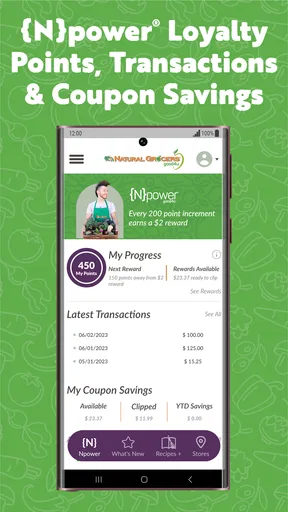
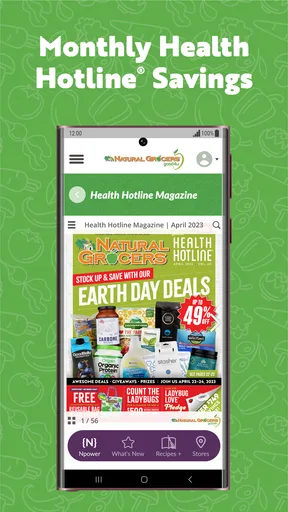
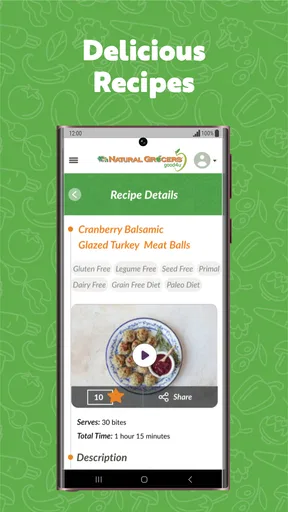
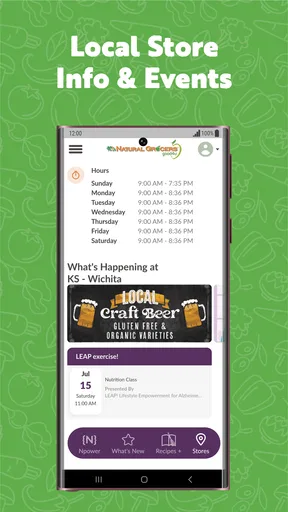
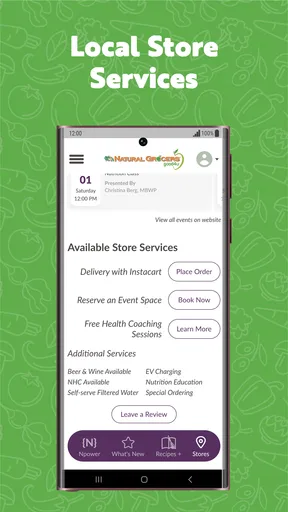
The Natural Grocers app is designed to help shoppers explore the retailer’s products, find nearby stores, check current promotions, and learn about available services. Depending on your location and the version installed, it may also provide access to digital coupons, shopping information, recipes, nutrition content, and store details. It is mainly a companion for planning visits rather than a complete replacement for in-store shopping.
Can I use the Natural Grocers app to find products and check availability?
You can use the app to browse information about many products sold by Natural Grocers, including groceries, supplements, body care items, and other health-focused products. However, product listings and availability may vary by store and region. Before making a special trip, it is sensible to contact your local location directly, because the app may not always show real-time inventory or immediate changes in stock.
Does Natural Grocers offer digital coupons, deals, or rewards through the app?
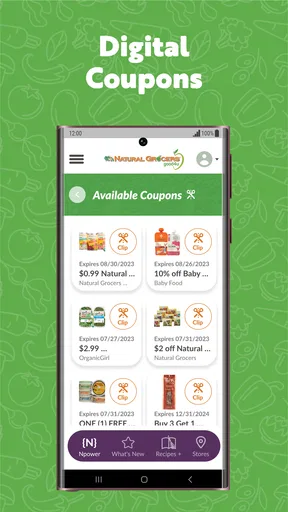
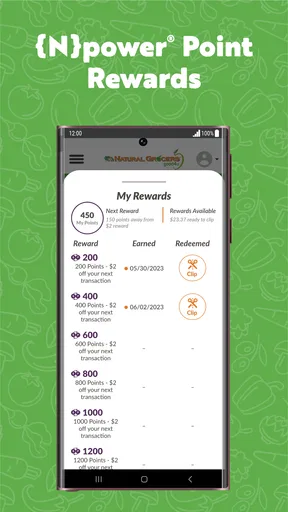
The app may provide access to current promotions, digital offers, or information connected with Natural Grocers’ savings programs, depending on the features supported in your area. Some offers can require an account, registration, or identification at checkout. Promotion terms, expiration dates, eligible products, and participating stores can change, so review the details inside the app before relying on a discount.
Does the Natural Grocers app require an account or collect personal information?
Some basic features, such as viewing store information or browsing general content, may be available without creating an account. Features involving coupons, personalized offers, shopping preferences, or communication settings may require registration. As with most retail apps, the application can process information such as account details, device data, and usage activity. Check the app’s privacy policy and permissions before signing up.
Is the Natural Grocers app available for both Android and iPhone?
Natural Grocers’ mobile services may be offered through an official app, a mobile-optimized website, or both, depending on the current release and your region. Availability, supported devices, and features can change over time. Download only from the official Google Play Store or Apple App Store, verify the publisher name, and keep your operating system updated for the best compatibility and security.


